Halomedis DICOM
The bridge between your ultrasound machine and the medical record. Receive DICOM images straight from the modality on your clinic network, keep them tidy per patient, then use them as the source for a SatuSehat ImagingStudy.
One window for every incoming study
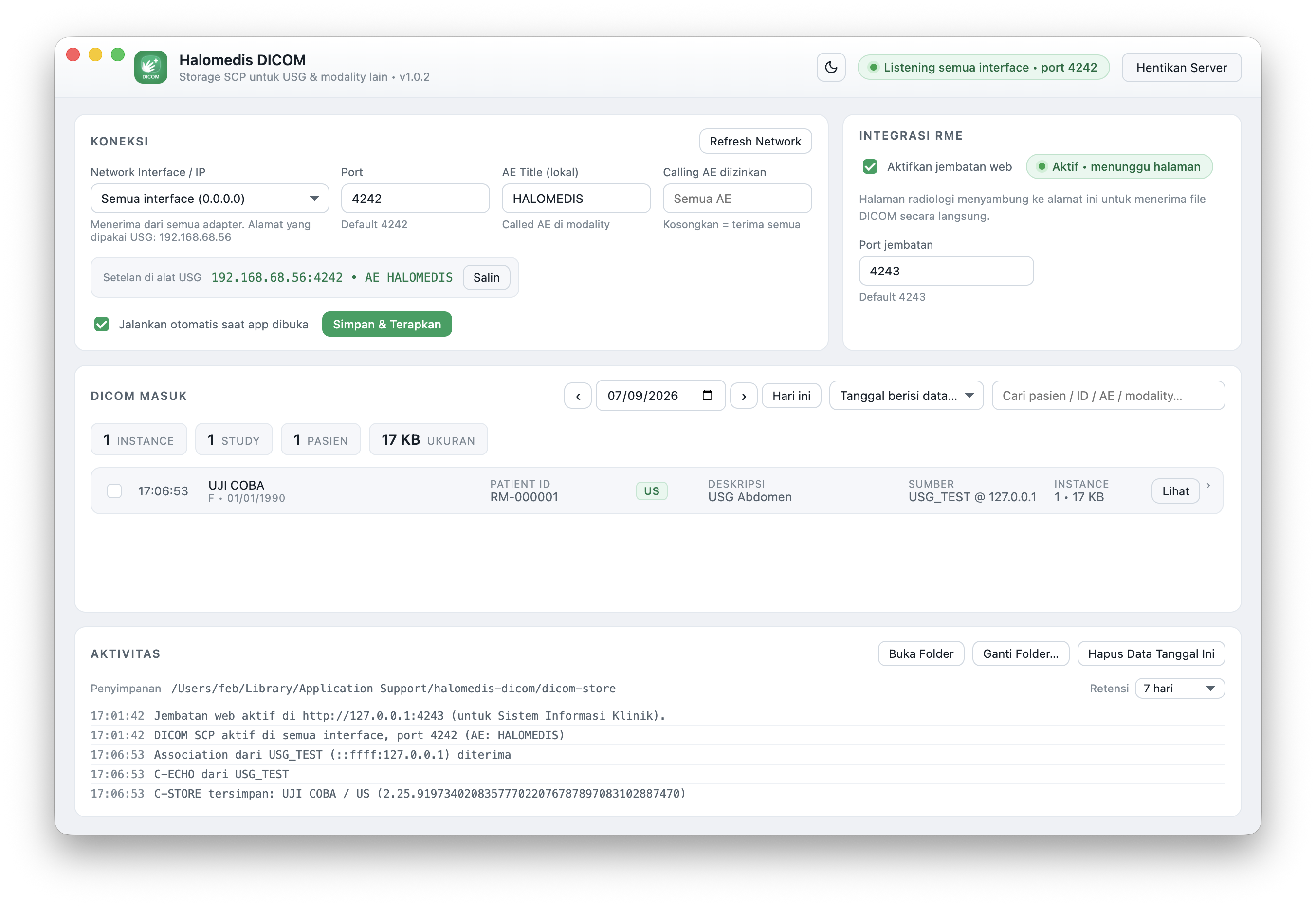
Server status, connection settings, the list of incoming images and the activity log - all on a single, compact screen.
4242
Default DICOM port
C-STORE
Received straight from the modality
7 days
Automatic retention, adjustable
Local
Data never leaves the clinic network
From the ultrasound machine to the medical record in four steps
No PACS server, no carrying images around on a flash drive. All you need is one computer on the same network as the ultrasound machine.
Install and run
Install the app on a computer that sits on the same network as the ultrasound machine. The DICOM server starts as soon as the app opens.
Point the machine at it
Enter the IP, port and AE Title shown by the app into the ultrasound machine's DICOM menu, then confirm the link with a C-ECHO test.
Images arrive automatically
Every time the operator presses Send or Store, the image travels over C-STORE and appears in the list in real time, grouped by study and patient.
Attach and report
Pick the instances you need, export the .dcm files to attach to the Halomedis record, and report the examination to SatuSehat as an ImagingStudy.
As light as a utility, as complete as a small PACS
Everything you need to receive, browse and tidy up the DICOM data your clinic produces every day.
Standard Storage SCP
Accepts C-STORE for every standard Storage SOP Class - US, US Multiframe, Secondary Capture, CT, MR - plus C-ECHO so the machine can test the connection.
Choose the network interface
A dropdown lists the available adapters (Ethernet, Wi-Fi, VPN) with their IP addresses, or you can listen on every interface at once.
Flexible port and AE Title
The default port 4242 and AE Title HALOMEDIS can be changed without closing the app, including restricting which Calling AE Titles may send.
Grouped by study
Open any study to inspect each instance: SOP Instance UID, image dimensions, file size and the time it was received.
Date filter and search
Jump to any date with the previous/next day buttons, or search by patient name, Patient ID, sending AE, modality and description.
Export and open files
Export the selected instances, delete a whole day of data, or open a file directly in your system's default DICOM viewer.
Automatic retention
Anything older than N days is cleaned up when the app starts. The default is 7 days and it can be set all the way to forever.
Real-time activity log
Watch incoming associations, C-ECHO and C-STORE requests so you can troubleshoot the machine setup on the spot.
Light and dark mode
The interface adapts to the lighting in the examination room, and your theme choice is remembered for next time.
Settings on the ultrasound machine
Enter these four values in your ultrasound machine's DICOM menu. The app shows the full address and gives you a copy button.
| Parameter | Value |
|---|---|
| Destination host / IP | The IP shown on the “Settings on the ultrasound machine” card |
| Port | 4242, or any other port you choose |
| Called AE Title | HALOMEDIS, or the AE Title you entered |
| Calling AE Title | Anything, unless you restrict it in the “Allowed Calling AE” field |
On first launch macOS or Windows will ask for firewall permission so the app can accept incoming connections. Allow it, otherwise the ultrasound machine cannot send data.
Ready to run on macOS & Windows
Pick the build that matches the computer in your examination room. Installation takes only a few minutes.
macOS
.dmg package
Pick the build that matches your Mac's chip
Windows
.exe installer
Windows 10 or 11, 64-bit
Need a hand installing it? The Halomedis team can walk you through it over WhatsApp.
Questions about Halomedis DICOM
The things clinics most often ask before installing the app.
Want ultrasound results to land in the medical record?
Our team can install the app, configure the ultrasound machine and make sure the examination is reported to SatuSehat.